Ipelets
A collection of ipelets that save me a lot of time when drawing figures.
To use, add the .ipe files into your ./ipelets folder.
Dense Graphs
Some functions to draw dense graphs. These are included in k_clique.lua.
The following graphs can be drawn:
- Complete graphs.
- Complete multipartite graphs.
- Complete split graphs.
Usage
Complete graphs
A complete graph is a graph with vertices where there is an edge for any pair of distinct vertices.
To draw a complete graph embedded into a circle for any number of vertices, follow:
- Draw a circle using one of the three options of ipe.
- Select the circle
- Run “ipelets -> Dense Graphs -> Complete graph”
- Enter the number of vertices and accept.
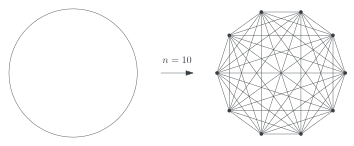
Example:
An example of a complete graph for :
Complete multipartite graphs
A complete multipartite graph consists of non-empty independent sets and is an edge whenever and with .
To draw a multipartite graph with independent sets where for all , embedded into lines, follow:
- Draw paths (lines, curves) .
- Select them in labelling order: First , then , , and so on.
- Run “ipelets -> Dense Graphs -> Complete Multipartite Graph”
- Enter the sizes of in this format: (no spaces).
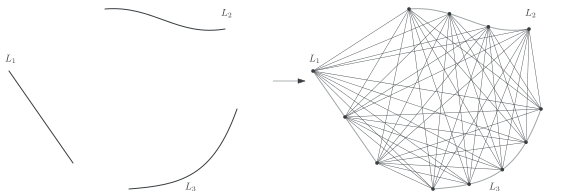
Example:
An example with three independent sets where :
Complete Split Graph
A complete split graph is a graph that can be partitioned in an independent set and a clique such every vertex in the independent set is adjacent to every vertex in the clique.
To draw a complete split graph with a clique with vertices and independent set with vertices, follow:
- Draw a circle and a path.
- Select both.
- Run “ipelets -> Dense Graphs -> Complete split graph”
- Enter the sizes (no spaces).
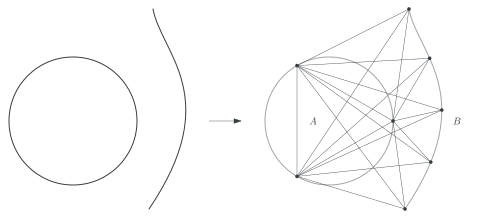
Example:
An example with and :
Intersection Graphs
Functions to draw intersection graphs. The ipelet is intersection_graphs.lua.
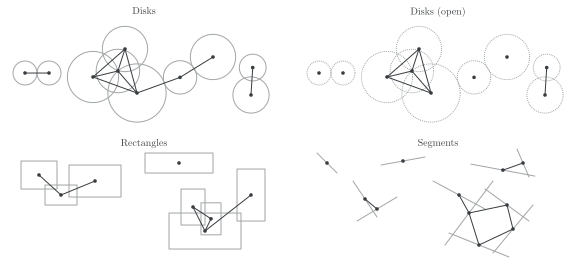
An (geometric) intersection graph is a graph that describes the intersection of a set of geometric objects. That is, two objects intersect if and only if their corresponding vertices share an edge.
To draw an [object] (objects: disk, open disk, rectangle, segment), do as follows:
- Draw some objects (of only one class)
- Select all of them
- Run “ipelets -> Dense Graphs -> [object]”
Examples:
Unwrap Circles
A function to unwrap a circle into a segment, preserving (scaled) length.
The circle may have some points in its boundary. When unwrapping, the position of points is also translated correspondingly.
The ipelet is unwrap_circle.lua.
Usage
To unwrap a circle, we do it deciding two things: the cut point and the unwrapping direction: clockwise or counterclockwise:
- Draw a circle with some points intersecting its boundary.
- Draw the cut point where desired.
- Select in this order:
- The circle ,
- the points and,
- the cut point (the function cuts the circle at the last point selected!).
- Run “ipelets -> Unwrap Circle”
- Enter scale (default is one) and choose direction.
Example
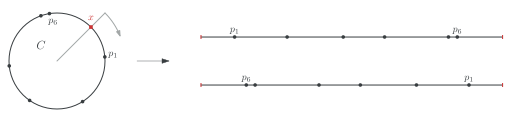
An example with six points on a circle . The grey arrow indicates clockwise direction. The unwrapped line above is clockwise; the one below is counterclockwise.
Both lines have 1 of scale factor.